

Prizma Visuals
MOD 2.0Let's build community together and explore the coolest world of APK Games/Apps.
Prizma Visuals 2.0 transforms Minecraft Bedrock with stunning lighting, realistic water, and cinematic skies — optimized for smooth performance on all devices.
Information
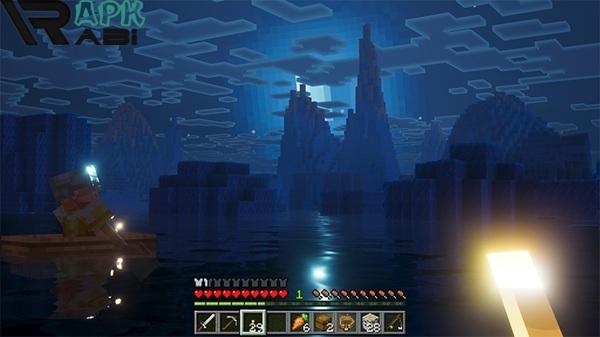
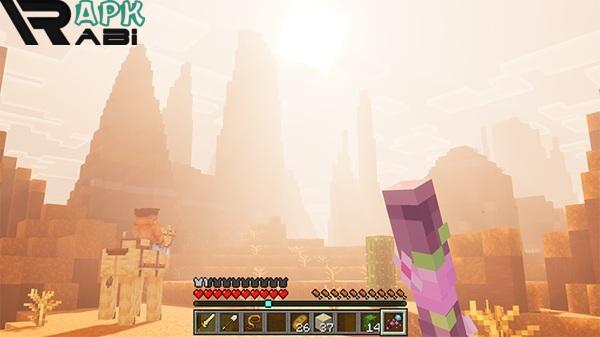
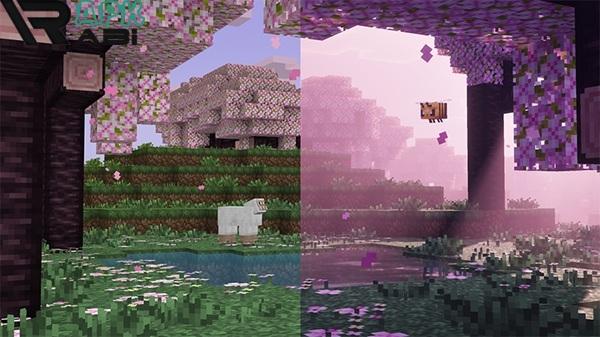
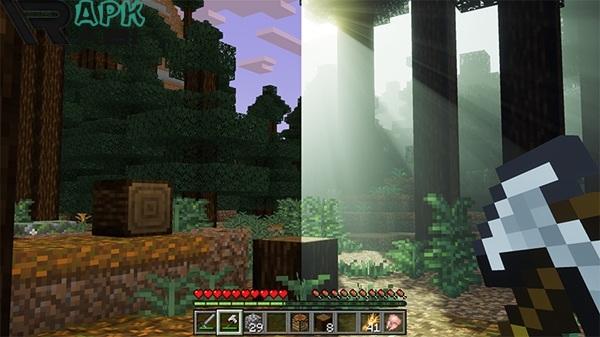
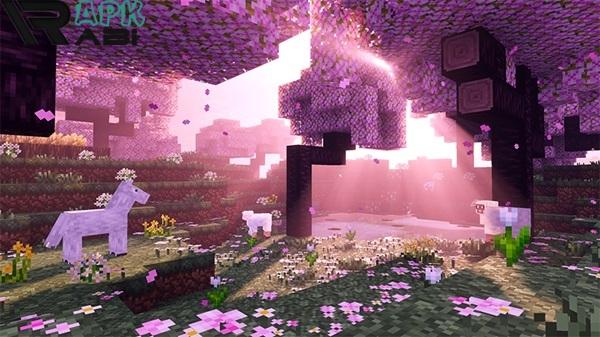
Prizma Visuals 2.0 for Minecraft Bedrock – A Stunning Shader Experience for Mobile and PC Players
If you’ve been searching for a way to make your Minecraft Bedrock worlds look more realistic, immersive, and vibrant, then Prizma Visuals 2.0 might just be the perfect solution. This shader pack, also known simply as Prizma Visuals, has quickly become one of the most talked-about visual enhancements for Minecraft players on Android, Windows 10, and Bedrock Edition. It blends artistry and optimization, transforming the familiar blocky landscapes into a visually stunning world without sacrificing performance.
In this article, we’ll explore everything you need to know about Prizma Visuals — its key features, performance, visual effects, and why it’s such a hit among Minecraft fans.
What Is Prizma Visuals?
Prizma Visuals is a high-quality graphics and shader pack designed for Minecraft Bedrock Edition. Its main goal is to improve lighting, shadows, water, and atmospheric effects, making the game look more lifelike while keeping the original Minecraft aesthetic intact.
Unlike many heavy shader mods that require powerful devices, Prizma Visuals Bedrock has been optimized to run smoothly even on mid-range smartphones and tablets. It’s an excellent balance between performance and beauty, offering a level of visual fidelity that’s rarely seen in Bedrock-compatible shaders.
Whether you’re playing survival mode, building creative masterpieces, or exploring custom maps, this shader enhances the mood and realism of your world — from glowing sunsets to reflective water surfaces.
Advertisement
Visual Upgrades and Core Features
Prizma Visuals 2.0 introduces a wide array of improvements to Minecraft’s default graphics. Here are some of the most notable features that make this shader pack stand out:
1. Enhanced Lighting System
Lighting is one of the strongest points of Prizma Visuals Minecraft Bedrock. It adds dynamic brightness levels that respond naturally to time and weather. During the day, light feels warm and vibrant, while nighttime brings cooler tones with smooth, realistic shadows.
2. Realistic Water Effects
The shader completely overhauls Minecraft’s water, adding depth, soft reflections, and gentle movement that mimic the look of natural water surfaces. Rivers and oceans now sparkle under sunlight, and rain adds ripples for an immersive experience.
3. Improved Shadows and Ambient Occlusion
Prizma Visuals Minecraft gives every object and block a sense of weight and realism. The shadows are soft, accurate, and adapt dynamically to the environment, making everything from trees to mountains feel more grounded and believable.
4. Atmospheric Skies and Weather
One of the most visually stunning aspects of Prizma Visuals 2.0 is its atmospheric sky textures. Sunsets now glow with warm gradients, the moon has a soft luminescence, and the clouds are reworked to create cinematic skies. Weather transitions, like rain and fog, are smoother and more natural than ever before.
5. Color Correction and Ambient Tone Mapping
This shader introduces improved color saturation and contrast, bringing life to the world without making it look oversaturated. Grass looks greener, caves appear darker, and biomes have unique visual moods — from the lush jungles to the frosty tundras.
6. Performance Optimization
Despite the detailed visuals, Prizma Visuals Bedrock is surprisingly lightweight. The developers have carefully optimized lighting and shader effects to ensure that even players with low-end Android devices can enjoy a smooth frame rate.
Why Players Love Prizma Visuals Minecraft Bedrock
Minecraft Bedrock players are always looking for ways to push their visual experience closer to what PC players with mods can achieve — and Prizma Visuals answers that call perfectly.
Here’s why it’s become a community favorite:
-
Balanced performance – Looks beautiful without lag.
-
Easy integration – Simple to install and compatible with most Minecraft Bedrock builds.
-
Aesthetic variety – Works equally well for modern builds, medieval maps, or natural survival landscapes.
-
Active development – The shader continues to receive updates, improving visuals and compatibility with newer Minecraft versions.
Many players describe Prizma Visuals 2.0 as “cinematic yet playable,” which is exactly what most users want — realism that doesn’t break the gameplay flow.
Technical Improvements in Prizma Visuals 2.0
The 2.0 update refined many aspects of the shader, making it a major step up from earlier releases. Below are some of the improvements introduced in the latest version:
-
Revamped lighting calculations for smoother brightness transitions.
-
Enhanced fog and distance effects that give the world depth and scale.
-
Dynamic sky reflections for realistic water and glass surfaces.
-
New particle effects for torches, glowstones, and campfires.
-
Subtle bloom and tone mapping that enhance brightness without washing out textures.
Advertisement
These updates make Prizma Visuals Minecraft Bedrock 2.0 feel more polished than most shaders in the same category.
Customization and Player Experience
One of the biggest strengths of Prizma Visuals is how it respects player creativity. Minecraft is all about freedom — and this shader embraces that philosophy. Players can freely explore, build, and craft while enjoying more emotional lighting and atmospheric settings.
Here’s how the shader enhances the gameplay mood in different scenarios:
-
Building projects: Architectural builds appear more realistic with soft light and shadow interplay.
-
Exploration: Forests feel alive with misty mornings and glowing sunsets.
-
Mining adventures: Underground lighting creates tension and mystery, giving caves a cinematic edge.
-
Creative photography: Content creators and screenshot enthusiasts love Prizma Visuals Bedrock download for its photo-realistic lighting that enhances Minecraft cinematics.
The shader’s adaptability makes it a great choice for all playstyles — whether you’re a survivalist, builder, or storyteller.
Compatibility and Accessibility
Prizma Visuals Bedrock is designed to work with:
-
Minecraft Bedrock Edition (Windows 10, iOS, Android)
-
Minecraft Pocket Edition on Android devices
-
Works best on versions 1.18 and higher
Players can easily add the shader to their worlds and enjoy enhanced visuals instantly. Since it’s crafted specifically for Bedrock, you don’t need third-party mods or complex setups to make it work.
Tips for the Best Visual Experience
To make the most of Prizma Visuals Minecraft Bedrock, follow these suggestions:
-
Adjust brightness and contrast from Minecraft settings for balanced visuals.
-
Disable other texture packs or shaders that may conflict with Prizma Visuals.
-
Use render distance wisely — medium to high settings provide the best results.
-
Play around with weather effects to experience how beautifully light interacts with fog and rain.
Final Thoughts
Prizma Visuals 2.0 represents one of the best shader experiences for Minecraft Bedrock and Pocket Edition. It elevates the game’s visuals with realistic lighting, reflections, and atmospheric depth while keeping performance in mind for mobile players.
Whether you’re a casual adventurer or a creative world builder, Prizma Visuals Minecraft Bedrock brings a new level of immersion and beauty to your blocky world. Its balance of performance, realism, and artistic style makes it one of the most recommended shader packs for Minecraft enthusiasts today.
Let's build community together and explore the coolest world of APK Games/Apps.





1. This is the safest site on the Internet to download APK. 2. Don't ask about the Play Protect warning, we've explained it well, check here. 3. Do not spam, be polite and careful with your words.